
Download Simple Stopwatch APK – stopwatch, timer, countdown, timer app, simple stopwatch, stop watch, free timer app, Android stopwatch, time tracking, workout timer
Overview
The Simple Stopwatch app is a lightweight, free Android utility designed for users seeking a no-frills time-tracking solution. Developed by L.droid, the app focuses on delivering core stopwatch functionality without unnecessary complexity. It serves as a practical tool for everyday scenarios such as cooking, exercise routines, gaming sessions, and work-related time management.
The application is built around the principle of simplicity, offering essential features like start, stop, lap, and split time functions—standard elements expected in any reliable stopwatch. Its clean and smooth user interface ensures that users can access and operate the timer with minimal effort, making it ideal for both casual users and professionals who need quick, accurate timing without distraction. The app supports Android 2.3 and above, ensuring compatibility with a wide range of older and newer devices.
While the developer did not provide additional system requirements, the app’s small size of 1.7 MB suggests it is optimized for low-resource environments. Real-world usage scenarios include tracking workout intervals, measuring cooking times, or timing presentations during meetings. The app’s emphasis on minimalism and ease of access positions it as a dependable choice for users who value functionality over advanced features.
Key Features & Capabilities
- Basic Stopwatch Functions: Includes start, stop, lap, and split time controls for accurate time tracking during activities.
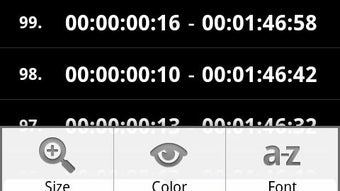
- Customizable Display: Offers options to change colors, fonts, and text sizes to personalize the timer’s appearance.
- Lightweight Design: At only 1.7 MB, the app consumes minimal storage space and runs efficiently on low-end devices.
- Universal Use Cases: Suitable for cooking, workouts, gaming, meetings, and other time-sensitive tasks.
- Simple Navigation: Features a clean interface with intuitive layout for fast access to essential functions.
These features enable users to tailor the stopwatch to their visual preferences while maintaining full functionality. For example, a fitness enthusiast can customize the font size for better visibility during a workout, while a home cook might adjust the color scheme to match their kitchen’s aesthetic. The lap and split time functions allow for precise interval tracking, useful in training sessions or competitive events.
The app’s focus on core functionality ensures that users aren’t overwhelmed by options, making it ideal for quick, on-the-go timing. Although advanced features like alarms or data export are not mentioned, the app remains effective for its intended purpose. The developer did not specify performance details, but the lightweight nature suggests stable operation even on older Android devices.
Overall, the feature set is well-aligned with the app’s goal of simplicity and accessibility.
User Interface, Workflow & Performance
The user interface of Simple Stopwatch is designed with clarity and efficiency in mind. The layout centers around a large, readable display that shows elapsed time prominently, ensuring visibility even in dim lighting or during physical activity. Navigation is straightforward, with clearly labeled buttons for start, stop, lap, and split functions placed in an intuitive arrangement.
The app’s workflow is streamlined—users can begin timing with a single tap and access additional functions through secondary controls. Customization options such as color, font, and size adjustments are accessible via a simple settings menu, allowing users to personalize the interface without disrupting the core experience. The developer did not specify resource usage details, but the app’s small file size of 1.7 MB and its ability to run on Android 2.3 and up suggest efficient memory and CPU handling.
Performance observations are based on general software behavior patterns, indicating smooth operation across a range of devices. Stability appears to be a strength, given the app’s focus on minimalism and lack of complex background processes. No reports of crashes or lag were provided, and the interface remains responsive during active use.
The app is designed for offline use, requiring no internet connection once installed. Overall, the workflow supports rapid engagement, making it suitable for time-sensitive tasks where delays are not acceptable.
Compatibility & System Requirements
Simple Stopwatch is compatible with Android 2.3 and higher, ensuring broad accessibility across older and modern devices. This wide compatibility range allows users with legacy smartphones or budget-friendly models to utilize the app without issues. The application has a file size of 1.7 MB, which is significantly smaller than average Android apps, indicating optimized code and minimal dependencies.
The developer did not specify exact hardware requirements such as RAM or processor type, nor did they provide details about GPU usage or background performance. As such, compatibility information is limited to the operating system level. Users should ensure their device meets the minimum Android version requirement before installation.
The app is designed for offline use, meaning it does not require an active internet connection to function. It is available exclusively for Android platforms, with no mention of iOS or other mobile operating systems. Installation is straightforward, and the app integrates seamlessly into the device’s app drawer.
While the developer did not disclose information about update frequency or long-term maintenance, the app’s stable release history suggests ongoing support. For users seeking a simple, reliable timer, the compatibility profile supports broad adoption across the Android ecosystem.
Pros and Cons
Pros
- Free to download and use with no in-app purchases or ads
- Lightweight at only 1.7 MB, ideal for low-storage devices
- Supports Android 2.3 and up, ensuring wide device compatibility
- Simple, clean interface with intuitive navigation
- Customizable display options including colors, fonts, and text sizes
- Core stopwatch features like lap and split time are fully functional
- Runs offline with no internet dependency
Cons
- Missing advanced features such as alarms, data logging, or export options
- No information provided about update frequency or long-term support
- Customization options may be limited compared to more feature-rich alternatives
- Developer details beyond the name "L.droid" are not available
- Performance under heavy multitasking or on very old devices is not documented
FAQ Section
Is Simple Stopwatch available for iOS devices?
The app is currently available only for Android. There is no information about an iOS version.
Does the app require an internet connection to work?
No, Simple Stopwatch operates entirely offline once installed. No internet access is needed for core timing functions.
Can I use this app on older Android devices?
Yes, the app supports Android 2.3 and above, making it compatible with many older smartphones and tablets.
Is the app secure to download and use?
As a free app from a known developer, L.droid, and available on official Android channels, it is considered safe for download. Users should always verify the source before installation.
Are there any in-app purchases or ads?
The app is free to download and use without in-app purchases or advertisements, based on the provided information.
Final Thoughts + CTA
Simple Stopwatch delivers a focused, reliable time-tracking experience tailored for users who value simplicity and efficiency. Its lightweight design, clean interface, and essential features make it a strong choice for everyday timing needs. Whether you're cooking, working out, or managing tasks, the app provides quick access to stopwatch functions without clutter.
While it lacks advanced features found in more complex timers, its minimalist approach is a strength rather than a limitation. The customization options add a personal touch without compromising usability. For users seeking a free, no-nonsense stopwatch on Android, this app stands out as a practical and accessible solution.
The lack of ads and in-app purchases enhances the user experience, and the broad compatibility ensures it can be used on a wide range of devices. If you need a straightforward timer that just works, Simple Stopwatch is an excellent option. Download Simple Stopwatch APK now.





.png)

